HubSpot Login & Account Setup: A Step-by-Step Guide

It is Monday, coffee’s still hot, and HubSpot wants a six-digit code from an app you do not remember installing. Great start to the week.
If that’s you, or if you’ve been staring at the HubSpot login screen wondering why your password suddenly “doesn’t exist,” stick around. And if you’re brand new and still asking what is HubSpot in the first place, that’s fine too. We’ll get there.
I’ve split this into the order most people actually need it. A quick explanation of the platform. Then signing up for the HubSpot free CRM. Then the HubSpot login and sign in process itself, on a laptop and on your phone. Then the stuff that goes wrong. And at the end, a few things worth knowing about once you’re in, including what came out of HubSpot UNBOUND 2026.
Table of Contents
ToggleWhat Is HubSpot? A Quick Answer Before You Log In
Short version? It’s a CRM with a lot of tools bolted on.
Longer version: HubSpot keeps your contacts, deals, emails, support tickets and marketing campaigns in one database. Your sales person, your marketer and whoever answers support emails all look at the same customer record. No more “which spreadsheet is the right one” arguments.
People ask what is HubSpot actually good for, and honestly it’s easiest with an example. Say you run a small design studio. Someone fills in the contact form on your site. A few seconds later the lead shows up in HubSpot, it gets assigned to you, a polite follow-up email goes out on its own, and if that client ever complains about an invoice six months later, the whole history is sitting right there. You can do all of that on the HubSpot free CRM without paying a penny.
It’s not a small operation either. HubSpot’s CRM page says it has more than 306,000 customers in over 135 countries. Why should you care? Because it means nearly every tool you already use has a connector for it.
HubSpot Flagship Products at a Glance
HubSpot splits its software into “hubs.” You might use one. You might use six. Either way, it’s one HubSpot login for all of them. As of October 2026, these are the HubSpot flagship products listed on the official site:
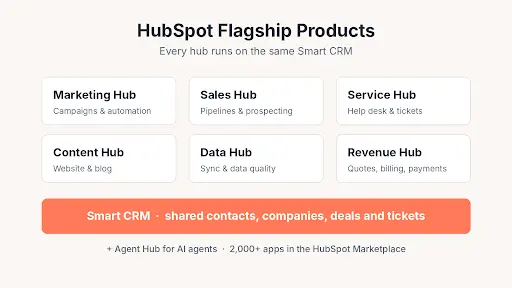
Hub | What it does | Who usually owns it |
|---|---|---|
Marketing Hub | Email, forms, landing pages, ads and HubSpot marketing automation | Marketing |
Sales Hub | Pipelines, sequences, meeting links, prospecting | Sales |
Service Hub | Help desk, tickets, customer portal, AI customer agent | Support |
Content Hub | Website pages, blog, AI content tools | Content / web |
Data Hub | Syncing and cleaning data | Ops / RevOps |
Revenue Hub | Quotes, billing and payments | Finance, sales ops |
Smart CRM | The database underneath all of it | Everyone |
Agent Hub | Building and managing AI agents | Admins |
Is the HubSpot Free CRM Really Free?
It is, and I was surprised too the first time. It isn’t a trial that quietly turns into a bill. There’s no expiry date and you don’t hand over a card. Right now the free tier gives you up to two users and 1,000 contacts, along with deal pipelines, email tracking, a meeting scheduler, live chat, forms and the Breeze Assistant.
Paid seats kick in when you need more. Starter is listed from $15 a month per seat, Professional from $50 and Enterprise from $75, according to the pricing section of HubSpot’s CRM page. Those numbers move around, so double-check before you put them in a budget. Plenty of small teams run on the HubSpot free CRM for a good while before upgrading.
How to Create a HubSpot Account (Sign Up Steps)
No account, no HubSpot sign in. Simple as that. Setting one up on the HubSpot free CRM takes about five minutes. Already got an invite from a colleague? Skip ahead to the login section.
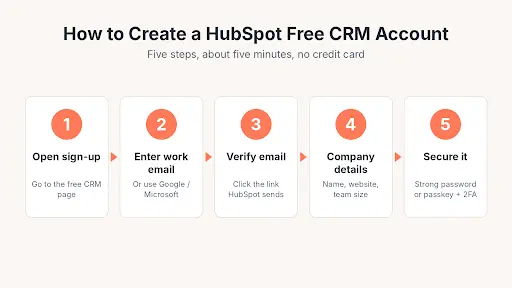
Step 1: Go to the Free CRM Sign-Up Page
Head to HubSpot’s free CRM sign-up page. Chrome, Firefox, Safari or Edge all work. You don’t install anything.
Step 2: Enter Your Work Email
Think about this one for a second. Whatever email you type here becomes your HubSpot login, and changing it later is more hassle than you’d expect. Use the address you’ll still have in two years. You can sign up with a Google or Microsoft account instead if you’d rather.
Step 3: Verify the Email Address
You’ll get a verification link. Click it in the same browser. Nothing after a few minutes? It’s probably sitting in spam or the Promotions tab.
Step 4: Add Your Company Details
Name, company, website, team size. HubSpot uses these answers to set up your portal and hand you a starter checklist. Get the website domain right, because tracking and email settings lean on it later.
Step 5: Choose a Password and Turn On Security
Use a long password you haven’t used anywhere else, or a passkey if your laptop or phone supports it. Then switch on two-factor authentication before you do anything else. Skipping 2FA is behind a huge share of “I’m locked out” stories, and turning it on now protects every HubSpot login you’ll ever make.
First 30 Minutes Inside Your New Account
Once you’re on the dashboard, I’d do these four things first:
- Import your contacts from a CSV or your old CRM.
- Connect Gmail or Outlook so emails log themselves.
- Invite your teammates and sort out who can see what.
- Add the tracking code to your website.
Setting HubSpot up because you’re tired of doing everything by hand? Our piece on business process automation for growing companies helps you figure out which jobs to hand off first.
HubSpot Login and Sign In: Step-by-Step
Right, the bit you probably came for.
Good news: the HubSpot login and sign in steps don’t change between Free, Starter or Enterprise. What changes is which options your admin has turned on. Once you’ve found the real HubSpot login page, bookmark it. Fake lookalike pages are a thing.
How to Log In to HubSpot on Desktop
- Open the HubSpot login page at app.hubspot.com/login, or hit “Log in” in the top right corner of hubspot.com.
- Type your email and click Next.
- HubSpot checks your email and shows you whichever screen fits your account. Could be a password box, a passkey prompt, or a jump to your company’s own sign-in page.
- Enter your 2FA code if it asks.
- If you use the Gmail or Outlook add-in, tick “Remember me.” It stops you getting signed out of them all the time.
That “Remember me” tip is straight from HubSpot’s Knowledge Base article on logging in. Small thing, saves a lot of annoyance.
HubSpot Sign In Options Explained
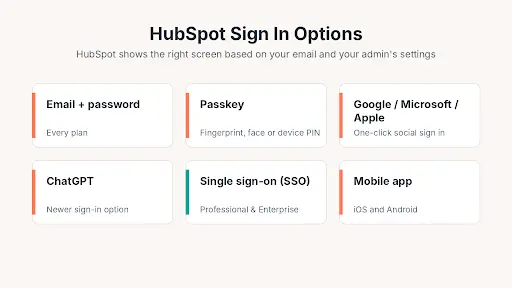
The HubSpot sign in screen gives you more choices than it used to:
- Email and password. The old faithful. Works on every plan.
- Passkeys. Your fingerprint, face or device PIN does the work. Quicker, and much harder to phish.
- Google, Microsoft or Apple. One click, as long as your HubSpot email matches.
- ChatGPT. A newer option, now listed in HubSpot’s own help docs.
- Single sign-on (SSO). Only on Professional and Enterprise. Your IT team manages access through something like Okta or Microsoft Entra ID.
A Note on SSO Sessions
Using SSO and getting kicked out after a day of not touching HubSpot? That’s normal. HubSpot can sign you out after 24 hours of inactivity when SSO is on.
HubSpot Sign In on the Mobile App
There’s an app for iOS and Android. Grab it from the App Store or Google Play, tap Log in, and use whatever method you use on your computer. With SSO, the app pops open your company’s sign-in page in a browser and then drops you back into the app.
The app can also approve 2FA requests, which makes each HubSpot sign in a bit quicker after that.
Setting Up Two-Factor Authentication
Click your name, go to Profile & Preferences, then the Security tab, then “Set up two-factor authentication.” You can pick an authenticator app, text messages or the HubSpot mobile app.
Save Your Backup Codes
During setup HubSpot hands you a list of backup codes. Please don’t skip past them. Put them in your password manager. Lose your phone without them and you’re waiting on an admin to rescue you.
HubSpot Login Security Best Practices
None of this is complicated, but it’s easy to put off:
- Use a passkey or a password manager. Not the same password you use for Netflix.
- Make 2FA mandatory for everyone, not just admins.
- Remove people from the portal on their last day, not three months later.
- If an email you weren’t expecting sends you to a HubSpot login page, close it and type the address yourself.
Ten minutes of setup. Most account takeovers stopped before they start.
HubSpot Login Problems and How to Fix Them
When a HubSpot login and sign in attempt fails, it’s almost always one of five things. Go through them in this order.
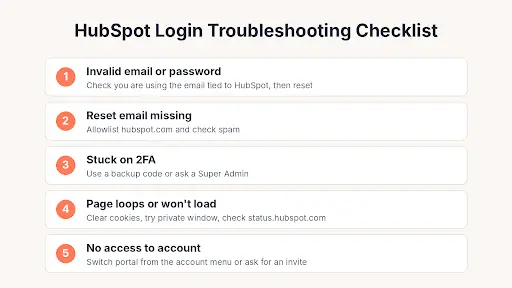
“Invalid Email or Password”
Lots of us have two work emails, or an old one hanging around from a previous job. Make sure you’re typing the exact address your HubSpot account uses. Sure it’s right? Use “Forgot password” on the HubSpot login page.
Password Reset Email Not Arriving
Add hubspot.com to your safe senders list and check spam. Company email filters sometimes sit on system emails for a few minutes before letting them through.
Stuck on the 2FA Screen
This is where those backup codes earn their keep. No codes? A Super Admin in your portal can reset your 2FA. If you’re the only admin, you’ll need HubSpot support.
The Page Won’t Load or Keeps Looping
Clear your hubspot.com cookies, try a private window, or switch browsers. Still stuck? Have a look at status.hubspot.com to see if HubSpot itself is down before you try the HubSpot login again.
“You Don’t Have Access to This Account”
You got in, just not to the right place. Click your account name in the top right and switch portals. If the one you need isn’t listed, someone has to invite you again. Access errors look pretty similar across CRMs, by the way. Our guide to fixing the insufficient privileges error in Salesforce walks through how admins usually track these down.
What to Do After Your HubSpot Login
The HubSpot login itself is the easy part, really. What you set up afterwards is where HubSpot starts paying for itself.
HubSpot Marketing Automation Basics
Workflows are what most people mean by HubSpot marketing automation. A good first one: someone fills in your contact form, they get a thank-you email, the contact owner gets a ping, and the contact lands on a nurture list. The HubSpot free CRM covers basic forms and marketing emails. For proper multi-step workflows you’ll need Marketing Hub Professional.
Good HubSpot marketing also depends on writing about the things your buyers are searching for. If you haven’t worked that out yet, our guide on how to choose keywords for SEO is a decent place to start.
HubSpot Integrations Worth Connecting First
The HubSpot Marketplace has over 2,000 apps. Looking at the most installed HubSpot integrations tells you what people really use: Gmail, Google Calendar, Outlook, Zapier, the WordPress plugin, Slack and Zoom. Coming from another CRM? There’s a two-way Salesforce sync and migration tools for Pipedrive.
My advice: even on the HubSpot free CRM, hook up your inbox and calendar on day one and leave the rest. Add other apps once you know what data you actually need.
HubSpot Updates From the Fall 2026 Spotlight
Twice a year HubSpot drops a big batch of features it calls Spotlight. The latest HubSpot updates arrived on September 16, 2026. The headline items:
- A rebuilt Breeze Assistant that passes work to specialised AI agents.
- A Smart CRM that logs calls, emails and meetings by itself.
- Context Home, which scores how complete your CRM data is for the AI features.
- Marketing Studio, a new place to plan campaigns.
- Built-in ChatGPT Ads and Microsoft Advertising.
- A Prospecting Agent that keeps an eye on 40+ buying signals.
The full list is on HubSpot’s Spotlight page. A lot of it is still beta, so check what your plan actually includes before you get the team excited.
HubSpot UNBOUND: The New Name for INBOUND
Back on April 7, 2026, HubSpot said goodbye to the INBOUND name after 15 years. The yearly conference is now UNBOUND. In its UNBOUND announcement, HubSpot’s reasoning was that growth these days covers sales, service and AI as much as inbound marketing. HubSpot UNBOUND 2026 took place in Boston from September 16 to 18, and that’s where the Fall Spotlight was launched.
What does that mean if you sell to other businesses? HubSpot wants to be the one system your whole revenue team works in. Our guide to B2B sales and marketing gets into why that kind of alignment makes revenue more predictable.
Frequently Asked Questions
What is the HubSpot login URL?
It’s app.hubspot.com/login. Type it yourself or use the “Log in” button on hubspot.com. Don’t trust links in random emails.
Is HubSpot sign in free?
Yep. Signing in doesn’t cost anything, and the HubSpot free CRM gives two users access with no time limit.
Can I use one HubSpot login for multiple accounts?
You can. One email can belong to several portals, and you switch between them from the account menu in the top right.
Why does HubSpot keep logging me out?
Usually it’s an SSO timeout, blocked cookies, or “Remember me” left unticked. Clear your cookies and log in again.
What is HubSpot used for?
Managing contacts, running email and ad campaigns, tracking sales deals and handling support tickets, all from one shared database.
Is the HubSpot free CRM enough for a small business?
For a team of one or two, often yes. You get contacts, deals, forms and email. Upgrade when you need more seats, automation or reporting.
Is there a difference between HubSpot login and sign in?
Nope. “HubSpot login and sign in” mean the same thing. Both lead to app.hubspot.com/login, and the HubSpot sign in options are identical either way.
Does HubSpot work on mobile?
It does. The iOS and Android app supports the same login methods as desktop, SSO included.
How do I delete or leave a HubSpot account?
An admin can remove you as a user. Closing a whole portal means a Super Admin cancels any paid subscriptions first, then requests deletion in account settings.
Final Thoughts
Most HubSpot login and sign in headaches come from skipping five minutes of setup on day one. Pick the right email, use a passkey or a decent password, turn on 2FA, save those backup codes, connect your inbox. Do that and every HubSpot sign in after takes about two seconds.
Still locked out of your HubSpot login? Go back to the troubleshooting checklist and work through it from the top. Nine times out of ten, the fix is in there.

About Adam
Adam is a blogger with over 10 years of experience writing about business growth, SaaS, digital marketing and finance. At OutreachHunt, he shares practical, research-backed guides for founders, marketers and working professionals.
View all posts by Adam